Delivering a great experience to your customers is just as important as delivering great work. What truly makes the difference is how your customers experience working with you.
Emails get buried. Attachments get lost. And every missing update becomes a small source of stress.
That’s where Client Lounge comes in.
We help you create beautiful customer portals that make collaboration simple, clear, and professional, without the need for any technical skills.
Each client gets a dedicated space where they can find:
- Files and deliverables
- Project progress
- Helpful links and resources
- Your branding and messaging
Client Lounge helps you:
- Look more professional,
- Improve communication and transparency,
- And deliver a smooth, modern experience to your clients.
Instead of juggling emails, scattered files, and disconnected tools, you can give each customer a clean and secure portal where they can find everything they need.
Client Lounge lets you build those portals in minutes.
A dedicated space for every client
A portal is a mini-website tailored to a specific customer.
Using our drag-and-drop editor, you can build one in minutes by adding:
- Titles, text, images, and videos
- Secure file sharing areas
- Call-to-action buttons
- Project phases and steps
- Contact points (email, links, etc.)
Every block is customizable to match your style
The Portal Editor, your client-facing showcase
This is where you design what your customers will see: their personal space, tailored for collaboration.
It offers:
- A simple drag-and-drop interface for real-time visual editing
- Customizable layouts and colors
- Mobile & desktop previews
- Secure file sharing and progress updates
Each portal becomes a polished “client-facing showcase” for your work.
Use this button to get started with the portal editor:
Create PortalWe also recommend you reading our guide: "Creating your first portal" to familiarize yourself with the block editor.
Your Dashboard, your backstage
Think of this as your control room.
It’s where you manage:
- Your portals
- Your customers
- Your account settings
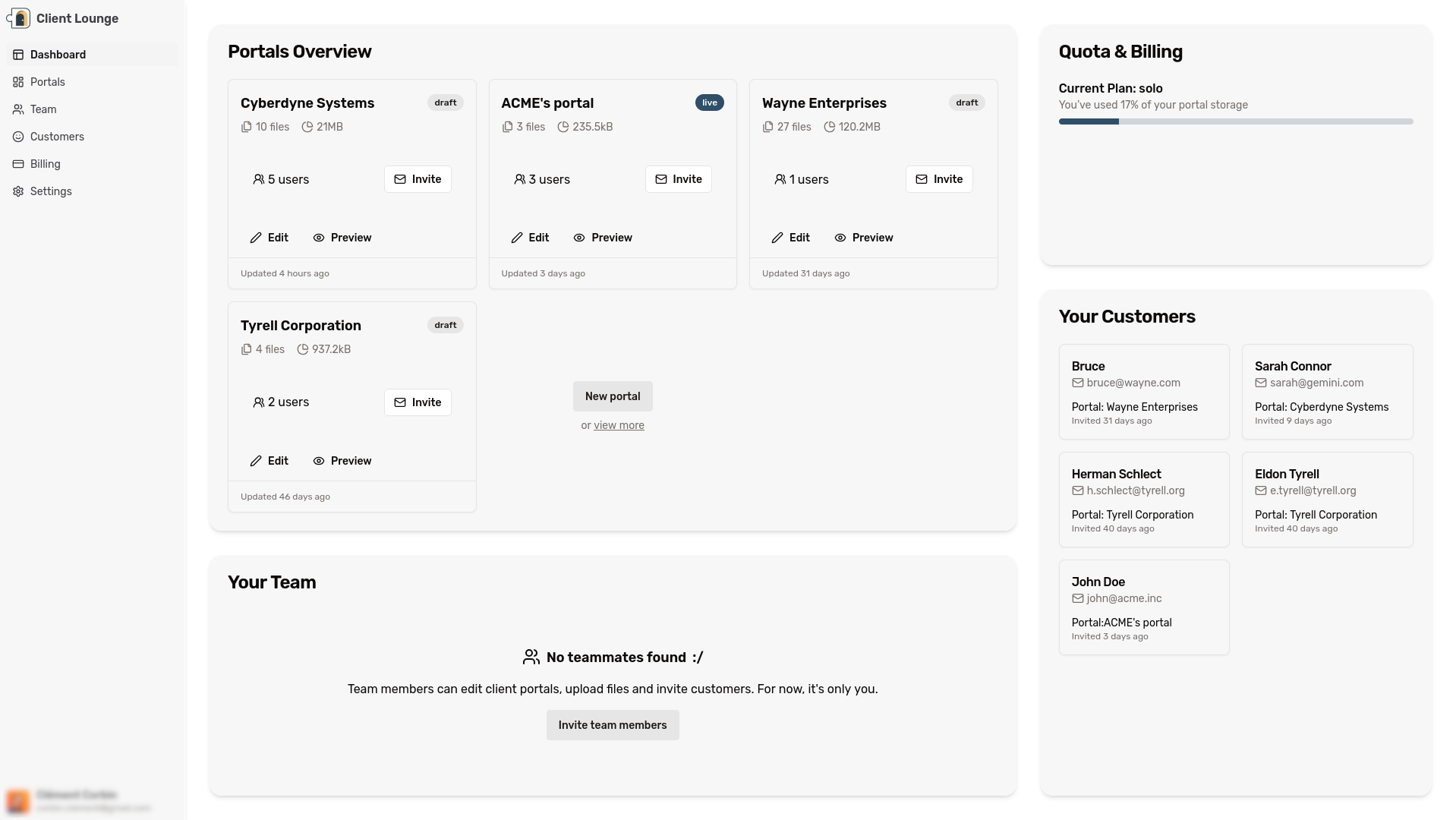
This is your workspace, while your clients only see the portal you made for them. You’ll access it after logging in. From there, you always have a full overview of what’s shared, who’s invited, and what’s next.
Open DahsboardRoadmap
Client Lounge is growing fast — and we’re just getting started.
Soon, you can expect:
- Integrations with third-party tools (CRMs, storage platforms, etc.)
- New content blocks regularly added to the editor
- Additional ways to automate collaboration with your clients
You can help shape the future of Client Lounge by sending us your ideas.
Use the “Feedback” button in the editor menu, or contact us anytime at:
📩 feedback@client-lounge.com
If you're ready for it, the best next step is to create your first portal, we’ll guide you through it in the next article.